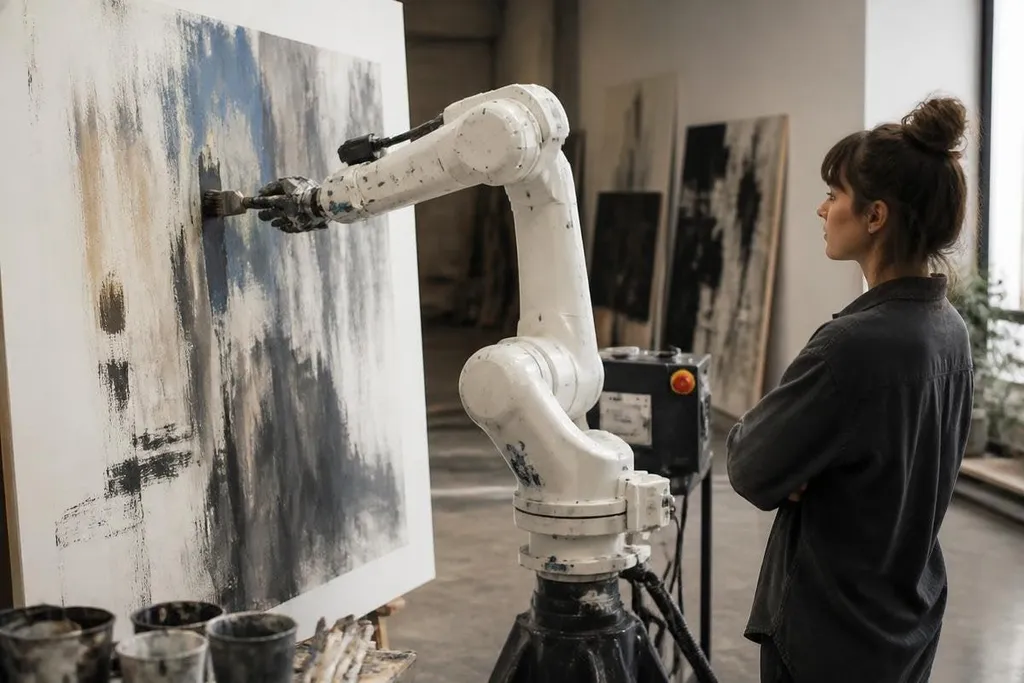
An art robot can turn a digital image into brush strokes, cuts, marks, or printed layers. AI changes the instruction, but the robot still has to control a motor, hold a tool, and work with real material.
The useful question is where AI helps, and where the physical work still sets the limit.
Quick read
- AI can turn an image or text prompt into a plan for movement.
- A robot arm still needs a tool, a stable surface, and safety limits.
- The final artwork depends on material, timing, and human choices.
What AI adds to an art robot
A standard robot arm follows programmed positions. An AI system can work from images, language, or sensor data, then choose a sequence of actions.
That sequence might tell the arm where to place a brush, how far to press, or when to change direction.
The robot still needs a physical tool. An end effector is the part fixed to the arm, such as a brush holder, pen, cutter, spray head, or gripper. The tool decides what the robot can do to the surface.
This split matters. AI can suggest a loose painting style, but it can't make a dry brush behave like a wet one unless the system also controls paint, pressure, speed, and contact with the canvas.
From image to movement
The process starts with a digital target. A vision system can read a picture of a canvas or inspect the work as it develops. Software then breaks the target into paths that the arm can follow.
Path planning turns those paths into joint movements. Each joint has a limited range, and the arm must avoid the table, the workpiece, nearby people, and its own links. A controller sends commands to the motors while sensors report the arm's position.
Feedback helps the system correct small errors. If the brush bends, the surface shifts, or the paint adds drag, the next movement can change. That does not guarantee a better result. It gives the robot a way to react instead of repeating the same motion.
A brush stroke can look autonomous even when a person sets each point by hand. Robot24 art robotics reporting can tie that detail to the robot’s control method and test date, then place creative work beside other uses for the same hardware.
Where the machine still falls short
Art materials are hard to model. Paper can curl. Fabric can move. Clay changes shape under pressure. Paint dries while the robot works. A plan that looks correct on a screen may produce a weak mark on the surface.
Repeatability can also be a problem. A robot may place a pen at the same coordinates each time, yet small changes in ink flow or surface texture can alter the result. That variation may be useful in art, but it makes the system harder to control.
The software has limits too. A generated image can look finished before anyone checks whether the robot has a safe way to make it. A human still has to choose the tool, set the work area, check the motion, and decide when the result is done.
The open question is authorship. If AI selects the image, software plans the strokes, and a robot makes the marks, the final work comes from a chain of choices rather than one hand. The machine adds a new process, but it doesn't settle who made the piece.
A practical check before buying or building
Use this list before you judge an art robot by its video:
- Name the material: Test the actual paper, canvas, wood, fabric, or clay you plan to use.
- Check the tool: Confirm that the end effector can hold the brush, pen, blade, or nozzle securely.
- Watch the path: Look for speed changes, sharp turns, tool lifts, and pauses in the motion.
- Set the safety area: Keep people outside the arm's reach and add a reachable emergency stop.
- Save the source files: Keep the image, movement plan, and settings for each finished piece.
- Judge the output: Compare the physical work with the digital plan after the material has settled.
I'd treat AI art robots as controlled tools with room for judgment, not as independent artists. Their value grows when the person running them knows which choices belong to software and which still belong to the hand at the controls.
The next useful test is simple: run the same design on the same surface with two tool pressures, then compare the physical marks rather than the screen preview.